
Introduction
Tired of “works on my machine” problems? Docker containers provide consistent environments for apps. Docker with a whopping 82.67% market share in containerization market dominates the market. We will try to analyse whether there is a better way to leverage software development into operations with enhanced ease and ability to scale/change your architecture at will? To understand we must know what is a docker container?
A Docker container packages applications in a segmented container allowing them to be utilized on any platform type. Let’s take a deeper dive and understand more about docker containers. Docker containers mimic the technologies used in virtualization by clubbing many components along with the infrastructure elements. As we all know the technology of emulating virtual servers, storage, network is called as virtualization and dockers make use of this concept and take it to another level that makes the effort of software developers very easy. Containers enable the operating system to be virtualised into virtualised silos to run container applications. Think of docker container as a customizable compartment containing your server, operating system, application, database which has an associated docker file and can be shared across colleagues within a team without having them work separately to setup the environment themselves, thereby saving a ton of time.
What are advantages of docker containers?
1.Container technology enables better and quicker applications scalability in virtualized environments as opposed to traditional non containerized virtual environments.
2.Also with DevOps testing the applications is seamless with a better turnaround time.
3.With dockers containers resource efficiency is enhanced as well.
4.Docker containers do not need a hardware hypervisor are process-isolated and don’t require a hardware hypervisor, hence Docker containers require lesser resources that makes them fast.
What are the downsides to containers?
1.One of the downside of open source container technology is that it is limited to use in Linux and Windows environments.
2.Containers based architecture becomes complex as mutiple teams work on various functionalities hence a high level of expertise is expected from the team members
3.As there is an enhanced pace with scaling containers in & out, hence it becomes demanding to secure the containers with traditional network and endpoint controls.
Docker Architecture
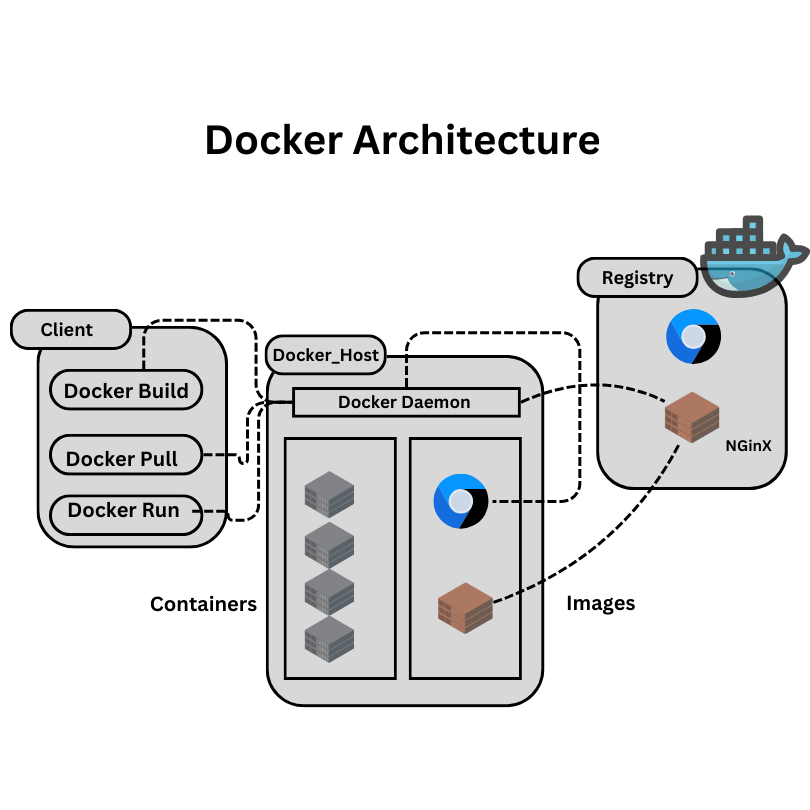
Core Components of Docker Architecture
Docker Client
The Docker client is the primary way users interact with Docker. It accepts commands and communicates with the Docker daemon through the Docker API. Key features include:
- Command-line interface for executing Docker commands
- Ability to communicate with remote Docker daemons
- Initiates most Docker commands like
docker run,docker build, etc.
Docker Daemon
The Docker daemon is the core component that manages Docker objects and is responsible for the following:
- Listening for Docker API requests
- Managing Docker objects such as images, containers, networks, and volumes
- Communication with other daemons to manage Docker services
Docker Registry
Docker Registry stores images and Hub is a public registry that anyone can use, while many organizations set up private registries. Functions include:
- Storing and distributing Docker images
- Supporting image versioning
- Facilitating image sharing among team members
Docker Objects
Docker objects are the core elements that Docker uses to create and manage containerized applications. Think of them as the Lego pieces that you use to build your Docker projects. These objects work together to create a seamless containerized environment for your applications.
Images
Images are like blueprints for your containers. They’re read-only templates that contain everything needed to run an application, including the code, runtime, libraries, and system tools. Here’s what you need to know about images:
- They’re built using a Dockerfile
- You can find pre-made images on Docker Hub
- Images are the starting point for creating containers
Fun fact: You can create your own custom images and share them with others!
Conclusion
Docker containers are AMAZING! They’ve totally changed how we make and run apps. They’re super portable, efficient, and can grow with your needs. But, apparently we know, nothing’s in life is perfect. They’ve got their own quirks and challenges too.
As more and more people start using containers, it’s REALLY important to understand what’s great about them and where they might not be the best fit. Perhaps, we can make smart choices about when and how to use them.
Isn’t Docker just fascinating? I love talking about this stuff!