
📚 Study Buddy
Your own AI study tutor on Telegram. It explains topics, quizzes you one question at a time, makes flashcards, summarises your notes and plans your revision. It remembers what you studied in the chat, and it can send you a daily revision question.
techprana-study-buddy.json
What it can do
/explain photosynthesisA simple explanation: definition, key points and an everyday example/eli5 black holesExplained like you are 10, with an analogy/quiz World War 25 multiple-choice questions, one at a time, with a score at the end/flashcards cell biology8 quick question-and-answer flashcards/summary + your notes5 key points, 3 terms to remember and 2 likely exam questions/plan maths exam on 10 DecA day-by-day study plan up to your exam/reviseA quick question on something you studied earlier in the chatYou can also just chat normally ("why is the sky blue?"). It replies in the language you write in, including Hindi and Hinglish. For maths and science it shows the steps, and for homework it explains the method and lets you try first instead of handing over the answer.
What you need (all free to start)
- n8n. The easiest way to start is the n8n Cloud free trial (14 days, no card, then a paid plan). The free option long-term is the self-hosted Community Edition. Telegram can only reach your agent at a public https address, so a self-hosted n8n needs a domain with HTTPS (or a tunnel). n8n on a laptop at home won't receive messages on its own.
- A Telegram bot. Free, made in the Telegram app in about a minute.
- A Google Gemini API key. Free from Google AI Studio. The template uses Gemini 3.5 Flash-Lite, which is on Gemini's free tier. Free-tier limits are set per project and change over time, so check yours in AI Studio. At the time of writing, developers reported a few hundred requests a day for Flash-Lite, and each message to your bot uses one request.
Set it up in 6 steps
- Create your Telegram bot. In Telegram, message @BotFather, send
/newbot, choose a name and a username ending in "bot". Copy the token it gives you and keep it private, because anyone with it can control your bot. - Get your Gemini key. Go to aistudio.google.com, sign in, choose Get API key and create a key. Keep it private too.
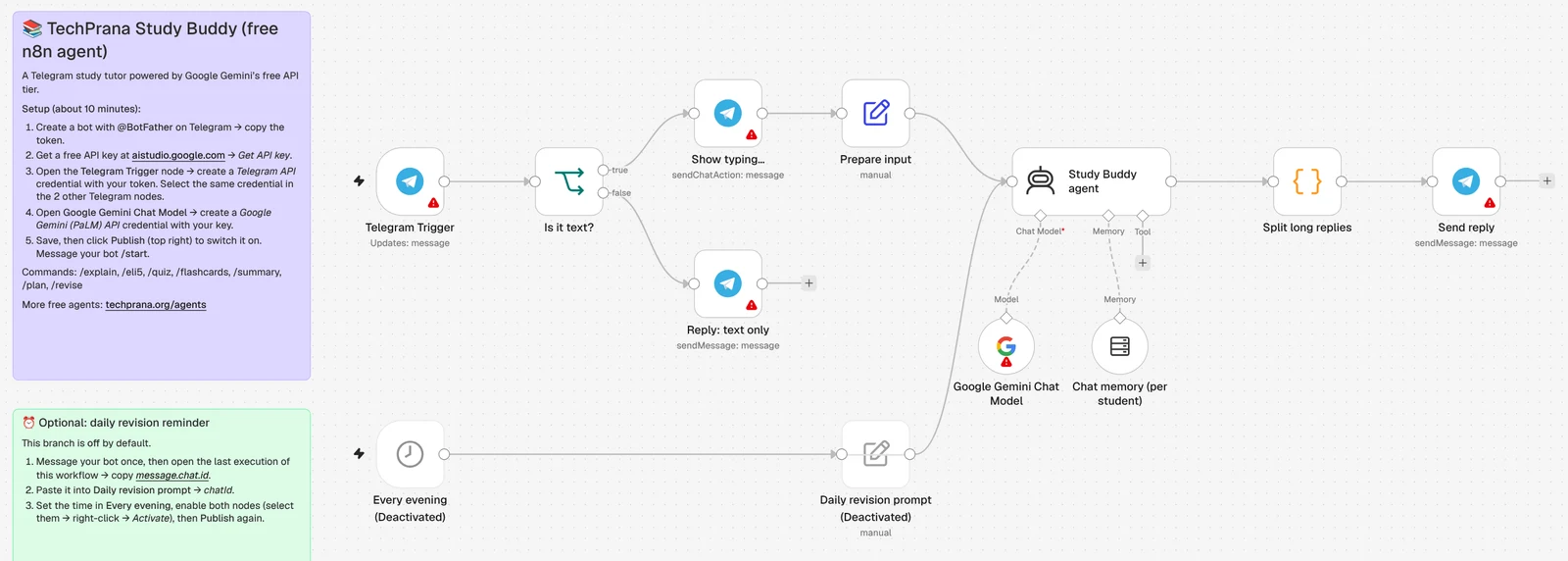
- Import the template. In n8n, create a new workflow, click the ⋯ menu next to the workflow name and choose Import → From file, then pick the file you downloaded. You'll see the workflow above with a "Read me first" note.
- Connect Telegram. Open the Telegram Trigger node → Credential → Create new, and paste your bot token. Then open Show typing…, Reply: text only and Send reply and select the same credential in each.
- Connect Gemini. Open Google Gemini Chat Model → Credential → Create new, and paste your API key. Leave the host as it is.
- Switch it on. Save, then click Publish (top right). Open your bot in Telegram and send
/start. 🎉
Optional: a daily revision question
The template includes a switched-off branch that messages you every evening. Send your bot any message, open the latest run under Executions, and copy the number at message → chat → id. Paste it into the Daily revision prompt node, set the time in Every evening (19:00 by default), select both nodes, right-click → Activate, then Publish again.
Make it yours
- Change the personality or rules: open Study Buddy agent → Options → System Message. It's written in plain English.
- Use a different model: pick another model in the Gemini node, or swap the node for another chat model (OpenAI, Anthropic, Ollama and others work with the same agent).
- Make it private: anyone who finds your bot's username can chat with it and use your free quota. To limit it to you (or your class), add a check on
message.chat.idin the Is it text? node.
Good to know
- Text only for now. If you send a photo or voice note, it politely asks for text.
- Memory: each chat gets its own short memory of the last 12 messages, so quizzes and
/revisework. The template uses n8n's Simple Memory, which resets when n8n restarts. For permanent memory, swap it for a database memory node such as Postgres or Redis. - AI can be wrong. Study Buddy is told never to invent facts and to say when it isn't sure, but always check important facts against your textbook or teacher.
- Privacy: on Gemini's free tier, Google may use your prompts to improve its products, so don't send personal or sensitive information. The template itself doesn't store or send your data anywhere else.
- Telegram's limit is 4,096 characters per message. Long answers are split into several messages automatically.
Troubleshooting
- The bot doesn't reply: check the workflow is Published, and look under Executions for a red (failed) run. Click it to see which step failed.
- "Quota exceeded" or 429 errors: you've hit Gemini's free-tier limit. Wait for it to reset (daily limits reset at midnight Pacific time) or pick another free model.
- "Bad webhook: HTTPS URL must be provided": your n8n isn't reachable at a public https address. See "What you need" above.
Want more? See all free agents · Play our free games