
Introduction
In today’s fast-paced technology landscape, organizations are increasingly embracing containerization to streamline their application deployment processes. At the forefront of this revolution stands Kubernetes, the open-source container orchestration platform that has become the gold standard for managing containerized applications at scale. Kubernetes’ journey began in 2014 when Google, drawing upon its extensive experience in running containerized workloads, released the platform as an open-source project. Since then, Kubernetes has experienced tremendous growth, becoming the cornerstone of modern cloud-native infrastructure. Kubernetes and Docker containers form a powerful duo, working in tandem to revolutionize application deployment and management. While Docker provides the containerization technology, Kubernetes offers a robust framework for orchestrating these containers across clusters of machines.
Benefits of Kubernetes
- Automation: Kubernetes includes built-in commands to handle much of the heavy lifting involved in application management, allowing you to automate daily operations. You can ensure applications always run as intended.
- Simplified infrastructure: When you install Kubernetes, it manages the compute, networking, and storage for your workloads. This allows developers to focus on applications without worrying about the underlying environment.
- Monitoring of environment: Kubernetes continuously runs health checks on your services, restarts containers that fail or stall, and makes services available to users only after confirming they are running.
Is it different from Docker?
Kubernetes and Docker are often misunderstood as an either-or choice, but they are actually complementary technologies for running containerized applications.
Docker packages everything needed to run your application into a container that can be stored and deployed as needed. Once the applications are containerized, Kubernetes manages them. The word “Kubernetes” means “captain” in Greek. Just as a captain ensures the safe journey of a ship, Kubernetes ensures the safe delivery of containers to their required locations.
You can use Kubernetes with or without Docker. Docker is not an alternative to Kubernetes, so the question is not “Kubernetes vs. Docker.” Instead, it’s about using Kubernetes with Docker to containerize your applications and run them at scale. The difference between Docker and Kubernetes lies in their roles. Docker is an open industry standard for packaging and distributing applications in containers, while Kubernetes uses Docker to deploy, manage, and scale containerized applications.
What are Kubernetes used for?
Kubernetes are used to create applications that are easy to manage and deploy anywhere. As a managed service, Kubernetes offers a range of solutions to meet your needs. Here are some common use cases.
- Building scalable microservices: Kubernetes excels in facilitating the development of cloud-native microservices-based applications. By breaking down complex applications into smaller, manageable components, developers can create more resilient and easily maintainable systems.
- Legacy app modernization: One of the key strengths of Kubernetes is its ability to support the containerization of existing applications. This feature serves as the cornerstone for application modernization, enabling businesses to breathe new life into their legacy systems and accelerate their digital transformation journey.
- Accelerated devlopment cyles: With Kubernetes, development teams can significantly reduce time-to-market for new applications. Its robust ecosystem of tools and services empowers developers to build, test, and deploy applications faster than ever before.
Cluster Architecture
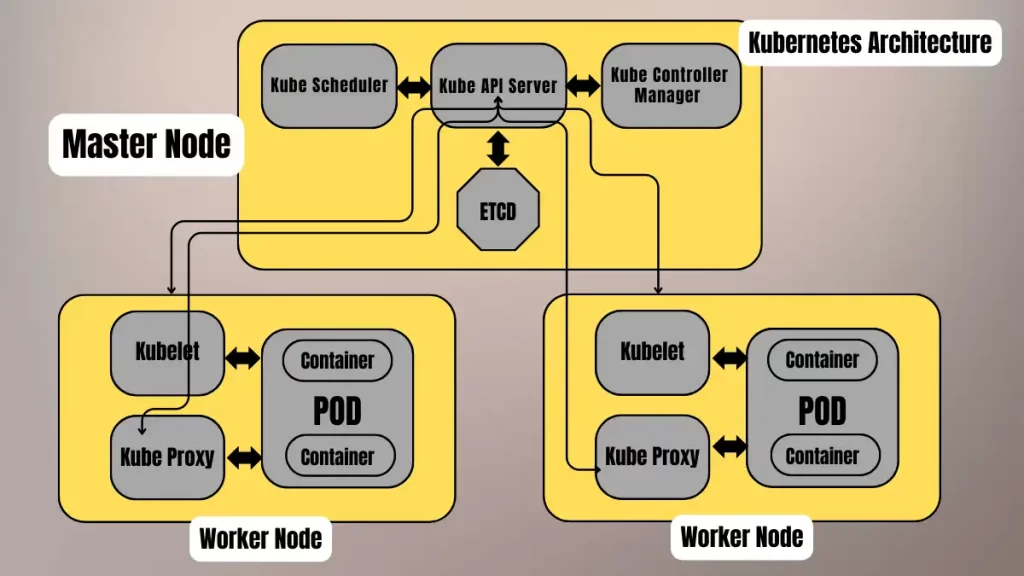
Control Plane components
- Kube API Server: The API server, a component of the Kubernetes control plane, exposes the Kubernetes API. It acts as the initial gateway to the cluster, listening for updates or queries via the CLI, such as Kubectl. Kubectl communicates with the API server to perform actions like creating or deleting pods.
- Kube Scheduler: When the API server receives a request to schedule pods, it passes the request to the scheduler. The scheduler then decides which node to assign the pod to, optimizing the cluster’s efficiency.
- Kube Controller Manager: The kube-controller-manager runs the controllers that manage various aspects of the cluster’s control loop. These controllers include the replication controller, which ensures the desired number of replicas of an application are running, and the node controller, which marks nodes as “ready” or “not ready” based on their current state.
- ETCD: The etcd serves as the key-value store for the cluster. It stores cluster state changes and acts as the cluster’s brain by informing the scheduler and other processes about available resources and state changes.
Node Components
- Kubelet: The kubelet interacts with both the container runtime and the node. It starts a pod with a container inside. It registers worker nodes with the API server and primarily works with the Pod specification – YAML or JSON) from the API server. The podSpec defines the containers that should run inside the pod, their resources (e.g., CPU and memory limits), and other settings such as environment variables, volumes, and labels.
- Kube Proxy: It forwards requests from services to the pods. Its intelligent logic ensures requests go to the correct pod in the worker node. Kube-proxy runs on every node as a daemonset, acting as a proxy component that implements the Kubernetes Services concept for pods. It provides a single DNS for a set of pods with load balancing. Kube-proxy primarily proxies UDP, TCP, and SCTP, and it does not understand HTTP.
Conclusion
So in conclusion, Kubernetes is essential for modern DevOps practices. It automates deployment, scaling, and management of containerized applications. This ensures consistency and efficiency. Its flexibility supports diverse workloads and infrastructure. Kubernetes’ robust ecosystem integrates well with CI/CD pipelines. This enhances continuous delivery and operations. Its self-healing and scaling capabilities improve reliability. Kubernetes simplifies complex deployments and resource management. Overall, it streamlines DevOps workflows and fosters innovation. Dynamic scaling optimizes resource utilization. Kubernetes enhances deployment consistency across environments. It promotes efficient collaboration between development and operations teams. This leads to faster delivery and innovation in software projects.