

Introduction
Well, for starters Jenkins is a Java based open source automation platform used for continuous integration. It is a wonder tool that caters to CI/CD pipelines used to create and test a product continuously so that software developers can integrate the incremental changes to the build. Streaming service providers utilize Jenkins’ capabilities to ensure uninterrupted content delivery to our devices.
Creating your first pipeline
What is a Jenkins pipeline?
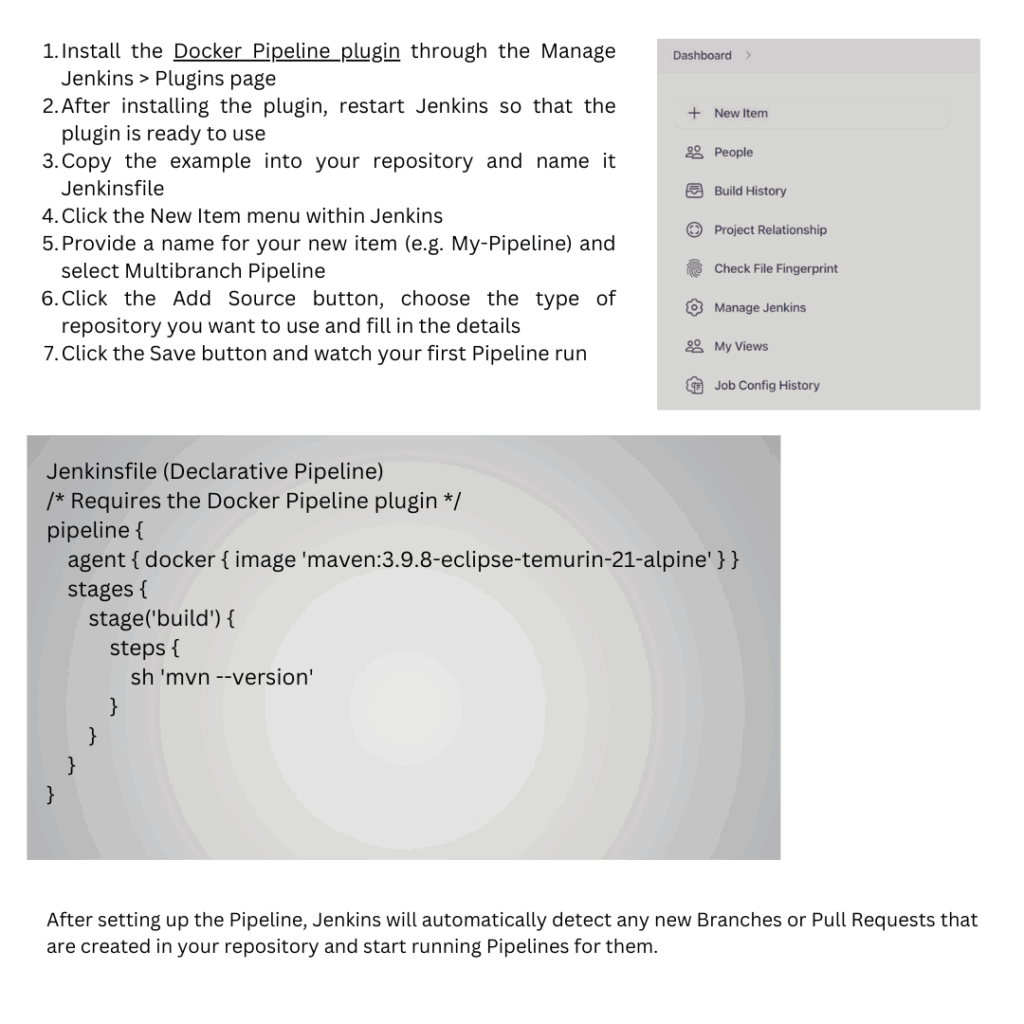
Think of pipeline as various software components called plugins which support the pipeline execution into Jenkins. The idea is to have an automated pipeline from the version control stage to the post deployment to users or client. Jenkins Pipeline provides a full array of tools for modeling simple-to-complex delivery pipelines “as code”. The definition of a Jenkins Pipeline is typically written into a text file (called a Jenkinsfile) which in turn is checked into a project’s source control repository. Let us get started quickly with Pipelines:
Best Practices
With the advent of Continuous Integration (CI), automated test execution and trend analysis most organization’s strategy for build management, release management, deployment automation, and test orchestration has transformed. Let us look at some of the best practices that aim to educate executives, business managers, software developers, and architects about the invaluable contributions Jenkins can make throughout the project life-cycle.
Automated job definition
You can leverage Jenkins to automatically create, update, and delete jobs based on the repositories defined in the software configuration management system. By redefining job definitions to maximize Jenkins’ automatic job management capabilities, you optimize job management effectively.. There are multiple alternatives for automatic job management, including:
1.Manually defined Pipeline jobs for more control over the job management process.
2.Create, update, and delete multi branch Pipeline folders and Pipeline jobs automatically
3.Create, update and deleted Pipeline jobs automatically
Report Builds
With an increased reliance on graphs and data driven charts, it becomes easy to manage project status and progress. Compiler warning messages often serve as the first indication of a problem. Static analysis tools are effective in reporting risky code or code with potential security risks. Performance test results help identify delays or areas of concern. There’s a useful plugin “Warning’s Next Generation” that provides many reports like compiler warnings and errors, static analysis warnings and errors, code coverage reports
Build on Agents
Use agents to perform builds instead of running builds on the controller. Utilizing agents offers enhanced safety and scalability.
Configure Notifications effectively
Jenkins can configure failure notifications to ensure they land up to the right team for remediation. This approach builds on the good practices and ensures that the right group gets to work on an issue to restore services.
Conclusion
In conclusion, Jenkins is an invaluable tool for a DevOps engineer. It streamlines the process of continuous integration and continuous delivery, automating tasks such as building, testing, and deploying applications. With its extensive plugin ecosystem and integration with various version control systems and build tools, Jenkins enhances efficiency and ensures consistent application delivery. Moreover, its job automation capabilities make it essential for optimizing workflows and maintaining seamless operations in complex software environments..